Backseat Offroad Controls Guide
PC, mobile, low range, and locker inputs—plus why you must check in-game binds.
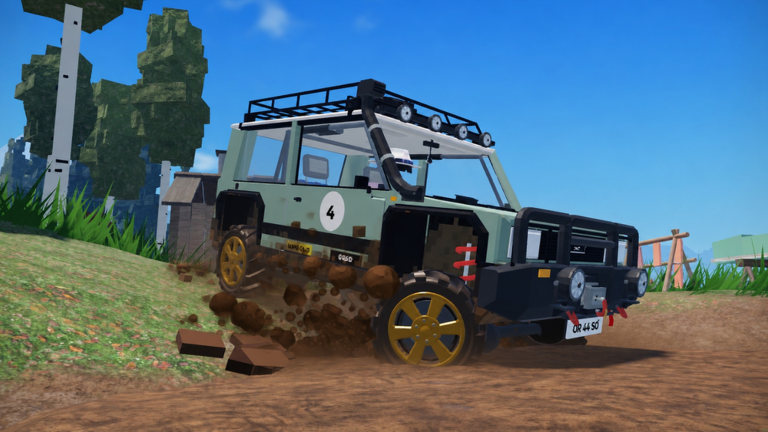
Mastering controls in Backseat Offroad matters more than raw horsepower. The five classic 4x4s reward smooth throttle, deliberate steering, and correct use of low range and differential lockers. This page explains typical PC and mobile patterns used across similar Roblox off-road experiences, then tells you how to confirm the real binds inside your client. Treat every key listed here as a starting reference, not gospel—open the in-game keybind or settings menu and verify before a hard climb.
If you are brand new, skim Getting Started first, then keep this tab open while you practice on lakeside forest roads.
Important disclaimer about keybinds
Roblox vehicle games often ship with WASD driving, on-screen mobile buttons, and extra toggles for transfer-case modes and lockers. Creators can remap defaults, and players can override them. Similar Roblox 4x4 crawlers commonly use keys such as K for differential lock and gear/mode selectors for low range (L / L+ style modes), but your Backseat Offroad session may differ. Before you memorize muscle memory from a video:
- Open the experience settings or controls panel.
- Note throttle, brake, steer, camera, low range / gear mode, diff lock, and winch actions.
- Rebind anything that conflicts with your keyboard layout or controller habits.
- Tell co-op partners which binds you use so callouts stay clear.
When a patch changes defaults, re-check. The Updates hub is the place to watch for control notes.
PC driving basics
On keyboard, expect standard Roblox driving conventions:
- Throttle / forward — commonly
Wor Up Arrow. - Brake / reverse input — commonly
Sor Down Arrow (confirm whether reverse needs a separate gear mode). - Steer — commonly
A/Dor Left / Right Arrow. - Camera — mouse look; keep the camera high enough to see the next shelf before your bumper does.
- Interact / winch UI — often a dedicated key or click prompt near valid anchors (trees, friend vehicles). Practice in a safe clearing via Winch Recovery.
Drive with small steering corrections. Old 4x4s in this game are built to crawl, not drift. Feather the throttle on wet roots and loose shale so you do not dig trenches that trap the axles.
Mobile and touch controls
On phones and tablets you will usually see virtual joysticks or tap zones for throttle and steering, plus extra buttons for gear mode, lockers, and winch. Tips that transfer well:
- Lower touch sensitivity if the truck feels twitchy on technical rocks.
- Keep thumbs planted; lifting mid-climb often causes a sudden throttle stab.
- Use landscape orientation for a wider view of switchbacks.
- Pause in a safe spot before hunting tiny locker icons near the rim of the screen.
- If chat overlays block buttons, hide chat while crawling.
Mobile players benefit even more from co-op spotters who can describe the line while you focus on throttle.
Low range and gear modes
Backseat Offroad’s fantasy centers on low range—crawl gearing that trades speed for control and torque. In similar Roblox 4x4 games, drivers select modes such as reverse, neutral, automatic/high range, and low-range options (sometimes labeled L and L+). Exact labels in your build may vary, so read the on-screen gear readout.
Use low range when:
- Climbing steep dirt or snow where high range only spins tires.
- Descending ledges where engine braking helps you creep.
- Picking through rock gardens that punish sudden wheel speed.
Stay out of low range when you are cruising gentle forest roads and need tighter, quicker steering response. Full detail lives in Low Range and Diff Lock.
Differential lockers
Diff lock forces wheels on an axle to rotate together. That helps when one tire is hanging in the air or sitting in slick mud while the opposite tire has grip. In comparable Roblox crawlers, lockers are often toggled with a key such as K. Confirm your bind, then practice this loop on a mild obstacle:
- Approach slowly in low range.
- Engage lockers before the unloaded wheel spins wildly.
- Creep forward with steady throttle.
- Unlock on firmer ground so turning feels natural again.
Leaving lockers engaged on high-traction surfaces can make the truck push wide in corners and stress driveline feel. Learn the “why” on the locker guide.
Winch-related inputs
Winch controls are usually a combination of aiming/selecting an anchor and a spool or pull command. Valid anchors include sturdy trees and a friend’s 4x4. Do not spam pull directions that tip you worse. Stage the cable in line with the obstacle, then apply power. Full technique—solo tree hooks and dual-truck rescues—is covered in Winch Recovery.
Camera, spotting, and UI habits
- Orbit the camera before blind crests.
- Watch tire contact patches, not only the hood ornament view.
- Glance at gear/locker indicators after every mode change.
- On shared screens, assign one player as spotter using voice or chat.
Practice routine (fifteen minutes)
- Verify binds in settings.
- Drive a flat lakeside loop focusing on smooth throttle.
- Climb a short hill twice: once in high/auto feel, once in low range.
- Toggle lockers on a rock with a diagonal axle twist.
- Hook a nearby tree and perform one clean pull-and-release.
- Repeat on mobile if you switch devices often.
Controllers and accessibility
If you use a gamepad, map throttle/brake to triggers if available, keep locker and low-range toggles on easy face buttons, and avoid burying winch confirm behind a menu you cannot open mid-slide. Remap anything that requires removing your thumbs from steering during technical sections.
Linking controls to the rest of the wiki
Controls are the gateway skill. After this page:
- Apply modes on real terrain with Low Range and Diff Lock.
- Build recovery confidence via Winch Recovery.
- Explore water hazards in Canoe and Water.
- Plan hardware changes with Vehicle Upgrades.
- Hunt cabins using Hidden Places.
- Return to the Guides Hub whenever you need the full list.
Also keep an eye on Codes (no confirmed promo codes yet) and Players for co-op etiquette that complements good inputs.
Final reminder
Memorize principles, not only letters on a keyboard. Smooth throttle, early low range on steep ground, lockers for diagonal traction loss, and verified binds will carry you from forest lake to snowy summit. When something feels wrong, stop on flat ground, open settings, and fix the control—not the mountain.
Frequently Asked Questions
Quick answers for crawls, winches, and co-op trails.
What is the diff lock key in Backseat Offroad?
Similar Roblox 4x4 games often use K, but you must confirm in the in-game keybind settings. Defaults can differ by patch or personal remaps.
How do I enable low range?
Use the on-screen gear or transfer-case mode control. Many crawlers offer L / L+ style low modes—verify the exact labels in your client.
Are mobile controls viable for summit climbs?
Yes, if you lower sensitivity, use landscape view, and practice locker/winch buttons in the forest before snowy grades.
Why does my truck understeer with lockers on?
Diff lock can reduce turning freedom on high-grip ground. Unlock on firmer trails and reserve lockers for rocks, mud, and unloaded wheels.